
Find your Neighborhood
Your will find your neighborhoods on the Block and Stack (VBS) and will be represented visually so you identify them quickly. If a neighborhood doesn't exist then you will have the ability to create them. Also, remember neighborhoods can incorporate Fixed Teams.
Identify your Neighborhood
Neighborhoods are a way of taking the Flexible working concept one step further, by letting multiple teams share the space. Just like flexible teams, neighborhoods are where you have no assigned seating and they can work a person to desk ratio greater than 1 person to 1 desk. An example of this is explained in Floor and Neighborhood Capacity Calculation.
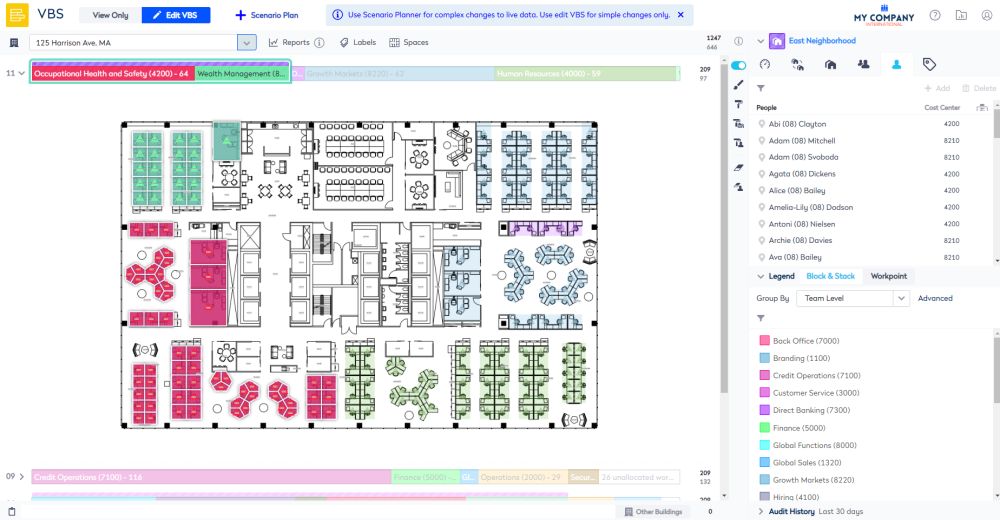
Below shows you the East Neighborhood that contains the Occupational Health and Safety team and Wealth Management team. The people in these teams can sit anywhere in spaces allocated to the neighborhood.
If the Neighborhood does not exist then you can create the neighborhood, and then allocate teams using:
If a Flexible Team is to be part of the neighborhood you can add the team.
Remember the Flexible Teams can sit inside or outside of a Neighborhood.