
C - Engage Distribution
Serraview Engage
Timings
Before your employees starting using Serraview Engage, we recommend that you coordinate the timings with your Customer Success Manager.
We need to know the expected number of new users and the dates of when they will start using Serraview Engage. We want to make sure your environment has enough resources to handle the incoming traffic.
Distribution
- URL Link that takes the employee to the app in the relevant store.
- QR Code that takes the employee to the app in the relevant store.
- Employee searches directly in the App Store/Play Store for the app.
Then you can send out an email notification to your employees.
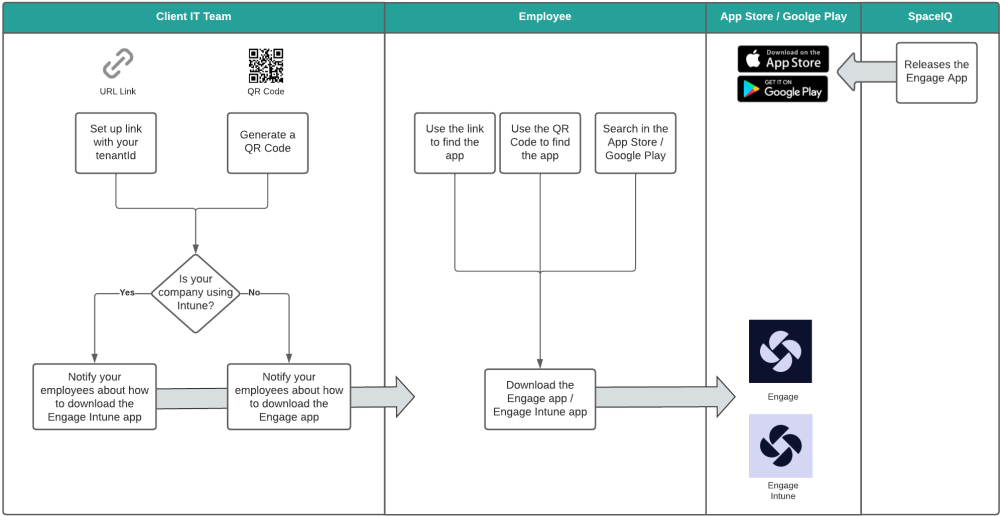
Distribute the App from a Link or QR Code
Engage supports the distribution of the Engage App from a Link or QR Code. When your employee uses either the Link or QR Code these will take then directly to the relevant store, where they can download Serraview Engage or Engage Intune, if your company is using Microsoft Intune.
For details on how to configure the Link or QR Code, refer to Configure the Engage App or Engage Intune App for Distribution.
Download the App from the App Store or Play Store
 Serraview Engage
- Your employees can search directly in the the relevant store for the app.
 Engage Intune
- If your company is using Microsoft Intune for mobile device management (MDM) and mobile application management (MAM). Then your IT team will know how to set this up, for more details, refer to Engage and Microsoft Intune for iOS and Engage and Microsoft Intune for Android.
For more details on downloading the different apps, refer to Download, Sign In, and Engage.
Last Onboarding Step
It's a wrap you have completed the onboarding!
- If you want to adjust the rest of the Serraview Engage settings for your business, then head on over to D - Additional Engage Configuration.