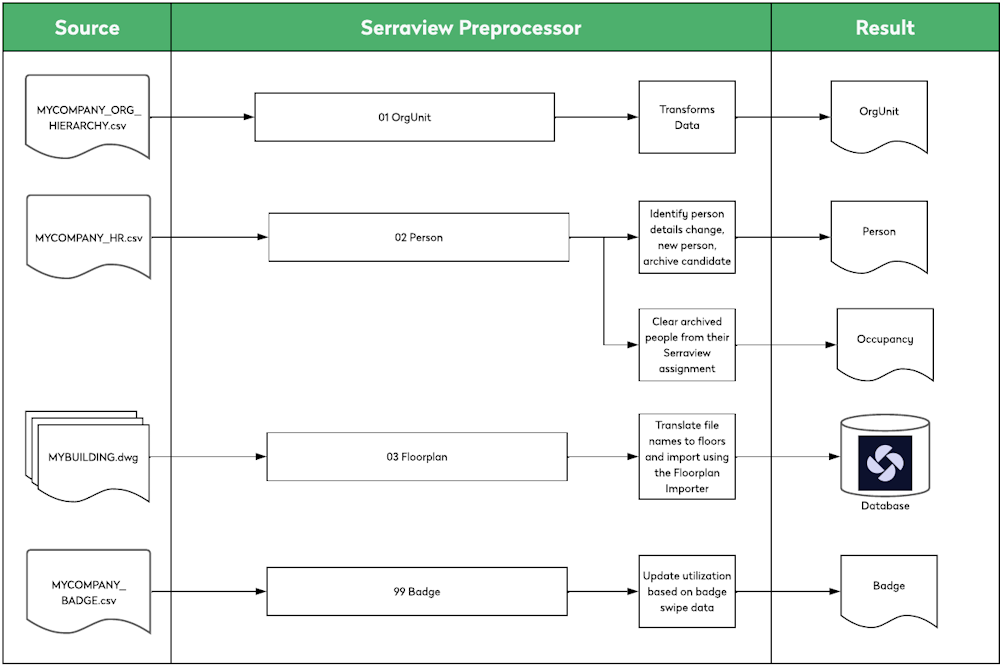
Automated Data and the Preprocessor

Most of our customers have an automatic import for data into Serraview and we can set up a preprocessor that contains instructions to process and transform data into a file that is consumable by the system.
This is used to when you want to update:
- People data
- Organizational unit data
- Block and Stack (VBS) - Occupancy, teams, or workpoint data
- Badge Utilization data
Input
Your IT team will set up an extraction of data from your HR system, this data is provided in a specfied format in HR files, based on the data requirements. These HR files contain details of where your people will be located, for example the building number and they contain the organization unit hierarchy. In this example the HR files received are:
- MYCOMPANY_ORG_ HIERARCHY.csv
- MYCOMPANY_HR.csv
Serraview Preprocessor
We can create a preprocessor that will contain instruction on how to process the data in the files and this is the automation of the data. This automation is best explained using an example.
When Serraview receives the HR files and based on the data in the files, the precessor will look for matches with certain data within Serraview.
- People data - This data can update a person details, create a new person, archive a person, or send a person to the archive candidates list when they are no longer in the HR data feed.
- Organization data - This data can be extract and the data can be in a managerial hierarchy, organization unit hierarchy, or a cost center hierachy.
Additionally, the preprocesor can set up to contain instructions for custom fields.
Matching an Unique Identfier
It is important to remember that the the building number or buidling name must be unique and it exists in the HR, as we can set up a preprocessor that looks following:
- If the budiling number is associated with their person record (in the HR file) and they are in the budiling, then the preprocessor will make a match and it won’t need to action.
- If the budiling number is associated with their person record (in the HR file) and they are not in the building then the preprocessor can add them to the Occupancy Import.
Output
The outputs are the the import files such as Person Import, Org Unit Import, Occupancy Import, Teams Import, Workpoint Import.
Serraview (behind-the-scenes) reorganizes the source file data into a format that is consumable by the system, and the resulting file is imported.
Learn More
- Portofolio Data - Import - Watch the “Methods of Data Transfer - Import into Serraview” video to learn about import methods and when the preprocessor is used.
Remember, this is an example and every customer is different!