
Floor plan Management
Important notes:
- If you are uploading floor plans into Serraview, we recommend that the space hierarchy be finalized before loading floorplans.
- Floor plans must be kept up-to-date with refurbishments to the floor.
Automated Floor Plan Importer
CAD files are uploaded using:
- Floor Plan Importer Tool
- File Upload (using the category Automated Floorplan)
- SFTP
Floor plan upload using the Floor Plan Importer Tool (automated)
This process uses of Serraview Floor Plan Importer tool to automatically process your floor plan and space mapping and involves extra configuration at implementation. For more information, see Upload Floor plan using the Floor Plan Importer Tool.
Floor plan upload using Floor Plan Importer (automated)
For large portfolios, the Floor Plan Importer can be set up to automate the drafting and mapping process by using the SFTP or File Upload (using the category Automated Floor plan). It can read the CAD plans and apply the correct drafting and mapping quickly with minimal intervention.
This allows you to:
- Initial Floor Plan Upload
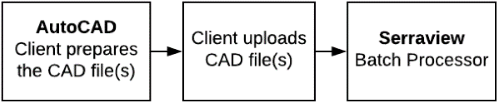
Upload new CAD files to Serraview and then the CAD files are batch-processed. The batch process will identify all spaces based on their polylines and will update the floorplans.
- Maintain Floor Plans
Also, we provide clients with the ability to update AutoCAD (CAD) drawings. You can export CAD files from Serraview, then the CAD files can be changed and then uploaded back into Serraview.

For more information, see Floor Plan Importer.
Manual Floor Plan Upload
If you do not have Floor Plan Importer set up, the Serraview Support team will manage the initial upload and ongoing updates of your CAD files and space mapping, see Manual Floor Plan Management.
Validate Floor plans
After the floorplan has been imported into Serraivew, we recommend you check the spaces and the space types, see Validate Floor Plans.