Explore Reports Central
System / Add-In Manager / Reports Central
Foundations / Background Data & Reports / Reports Central
Explore Reports Central
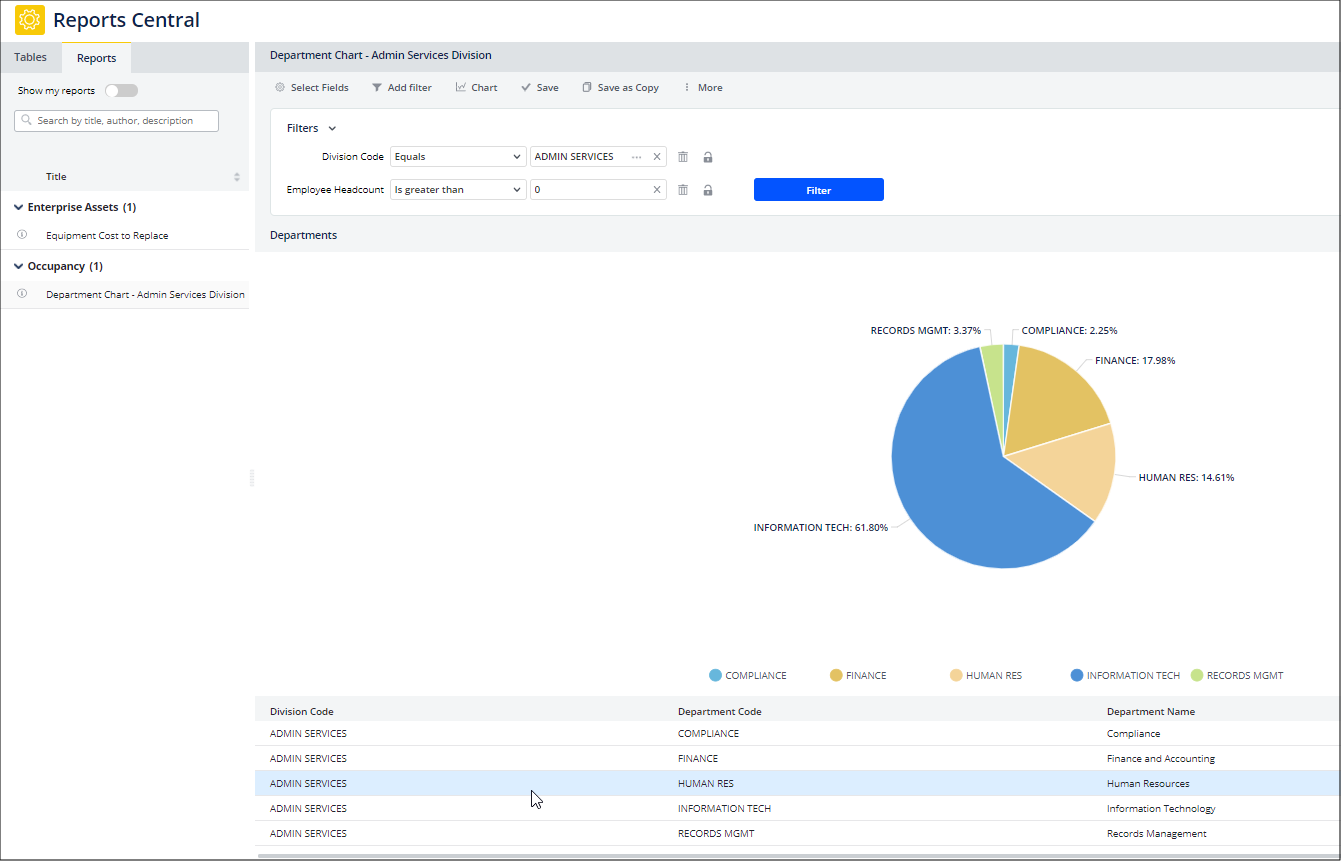
The Reports Central view (ab-rpt-wiz-main.axvw) provides all the tools you need for creating your own reports, as well as accessing reports made with Reports Central.
The view provides three main areas:
| Reports Central | Description |
|---|---|
| Tables Tab |
Presents all tables in the archibus schema. From this list, select a table for your new report and it displays in the display area on the right. You can now start building your report. |
| Reports Tab |
Use this tab to select reports that were made with Reports Central and saved with an identifying name. Select a report from the list, and it displays in the area on the right. For the sample HQ project, this section contains a set of sample reports you can examine in order to understand the capabilities of Reports Central. You can also use this section to delete reports, view report details, and search for reports. See Manage Reports . |
|
Display Area
(right panel) |
Displays reports that you load from the Reports tab If you are building a report, it displays in this area. The top area of this panel holds the set of commands for defining the details of a report: active fields, restriction, chart format, save options, and so on. If you have loaded a published report created by someone else and do not have permission to edit this report, the editing commands do not display.
|