
Add or Edit Asset Families
Enterprise Assets / Background Data - AssetsAssets / Assets / Background Data - Assets
Use the Add or Edit Asset Families view (ab-asset-families-edit.axvw) to define families that you can use to group similar Equipment Standards. For example, you might have multiple Equipment Standards for boilers to define their various capacities; can group together these equipment standards for boilers into a single “Boilers” family.
This table is also used to store the list of your Revit families. For example, in the sample HQ project the table is already filled with a list of Revit families.
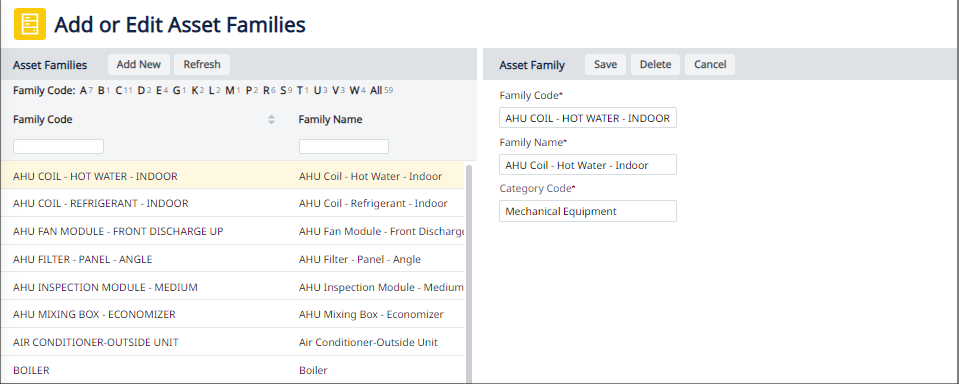
After you define asset families, you can associate them with equipment standards. See Define Equipment Standards. You can then search for assets in the BIM Viewer according to a standard mapped to a family. See Search for Equipment Standards.
To define an asset family
- Load the Add or Edit Asset Families task using the Navigator paths listed at the top of this topic.
- Click Add New to access the Asset Family edit form.
- Complete the Asset Family fields as follows:
| Field | Description |
|---|---|
| Family Code | Enter the value by which you will identify this asset family. |
| Family Name | Enter a descriptive name. |
| Category Code | Select a value from the validating Archibus BIM Categories table (System Management Help). |
See Also