
Archibus V.2026.01 Product Release
Archibus V.2026.01 includes several enhancements to improve your experience. Below are the highlights:
- Data Lake Integration
- Organizational Hierarchy
- Neighborhood Planning
- Archibus Assistant for Data Analysis (Preview)
- OnSite Condition Assessment – Offline Capability
- OnSite Asset and Equipment Registration
- Archibus BIM - Cloud Publishing via BIM Viewer
- Archibus Maintenance - Unified Work Requests
- Archibus Workplace - User Profile Management
- Archibus Reports Central - Virtual Calculations
- Archibus Maintenance - AI Work Request Summaries
- BOMA 2024 Office Standard Support
- Lease Agreement Onboarding REST API
- Automated Data Event Log Cleanup
Data Lake Integration
CUSTOMER IDEA
Data Lake Integration extends the value of Archibus beyond traditional IWMS reporting by enabling organizations to analyze facilities data alongside broader business data. By exporting Archibus data into a customer‑managed data lake, teams can create unified analytics, build richer reports, and answer more complex questions — supporting better strategic planning, executive reporting, and long‑term portfolio decisions.
Integrate facility data into your enterprise data platforms to create a secure, centralized foundation for analytics and reporting. This eliminates data silos, supports complex executive reporting, and ensures sensitive facility data is governed, monitored, and compliant.
Learn more
Organizational Hierarchy
CUSTOMER IDEA
Support multi‑level organizational structures across space and employee data, now with unlimited hierarchy, enabling more accurate reporting and alignment with real‑world organizational models: organizational allocation, space assignments, floor plan overlay, chargeback reporting, and printable floor plans.
Organizational Hierarchy helps Archibus customers reflect on how their organizations actually operate, not how systems force them to. By supporting multi‑level structures and extending them across space, inventory, and employees, Archibus enables more accurate planning, reporting, and decision‑making; giving teams the clarity they need to manage complex portfolios with confidence.
Learn more
Space Console
- Activate the View Settings - Within the Space Console, you can show the Organizational Units instead of the Departments.
System / Archibus Administrator
- Organization Migration Wizard - The migration wizard lets the Archibus Administrator create a new organizational hierarchy from the existing Division and Department hierarchy. Maps data from the rooms, employees, groups tables over to the new hierarchy.
Space Inventory
- Define Organizational Units - Use this task to define your unlimited Organizational Units hierarchy.
- Define Highlight Patterns and Hatch Patterns in Bulk - Use this to define the hatch patterns for organizational units.
- Define Group - Includes the 'Organization Code' field
- Define Locations - Includes the 'Organization Code' field
- Space Manager - Reports - The Organizations reports have the display switcher for Department and Organizational Units.
Occupancy
- Define Employees - Includes the 'Organization Code' field
- Occupancy Reports (Non-Transactional) - 'Employee Organizational Analysis by Location' - This view has the display switcher for Department and Organizational Units.
Space Chargeback
- Chargeback Reports - 'View Detailed Chargeback Analysis' - This view has the display switcher for Department and Organizational Units.
- Calculations for the Update Area Totals Task - Includes calculations for organizational units.
- Chargeback Calculations - Includes calculations for organizational units.

Neighborhood Planning
CUSTOMER IDEA
Plan team schedules and neighborhood allocations to set capacity and intent for hybrid workplaces. Balance demand with available space, helping teams avoid shortages and improve the day‑to‑day employee experience. Neighborhood Planning helps organizations bring structure and clarity to shared spaces. Space administrators can allocate neighborhoods by day of week based on agreed team needs, ensuring the right number of seats are available when teams plan to be onsite. This makes it easier to balance demand with capacity, reduce conflicts, and create a more predictable, positive experience as work patterns evolve.
Learn more
- Book a Workspace to find out how to make a booking in a neighborhood.
- Define Neighborhoods to learn how to set up neighborhoods.
Archibus Assistant for Data Analysis (Preview)
Ask questions in natural language and receive guided insights from facility and asset data, helping reporting analysts and managers get answers without building reports from scratch.
Archibus Assistant for Data Analysis helps organizations move from static reporting to more intuitive, question‑driven insight. By enabling natural‑language queries against Archibus data and supporting flexible AI model integration, the assistant makes it easier for teams to explore portfolio metrics, evaluate scenarios, and access the information they need without waiting on custom reports or specialized expertise.
Learn more
- ✨Ask AI
- Deploy AI Integration - Before the Archibus Assistant can be used, the AI Integration must be completed.
OnSite Condition Assessment – Offline Capability
CUSTOMER IDEA
OnSite Condition Assessment Offline enables field teams to conduct asset and facility condition assessments without continuous network connectivity. Assessors can capture conditions, observations, photos, and notes on their mobile devices while offline and sync the data once connectivity is restored.
By removing connectivity constraints in basements, remote sites, and secure areas, this enhancement ensures assessment data is captured accurately and on time. Organizations benefit from improved data quality, fewer repeat visits, and more reliable maintenance planning and capital forecasting—allowing teams to work where assets are, not where networks are strongest.
Learn more
- OnSite App has been released to the App Stores, see 2026 July OnSite Product Release
- Learn how to use OnSite Offline

OnSite Asset and Equipment Registration
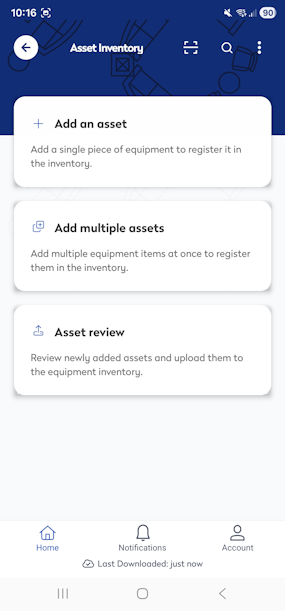
OnSite Asset and Equipment Registration allows mobile inventory users to add and register new assets directly in the field. Key asset details—such as location, attributes, photos, and identifiers—can be captured at the point of discovery, ensuring accurate records from the start.
This capability reduces gaps in asset visibility by eliminating delayed or incomplete registrations. By enabling real‑time asset creation during site visits, organizations improve data accuracy, reduce administrative effort, and move faster from discovery to maintenance and lifecycle management—resulting in a more complete and reliable asset register.
Learn more
- OnSite App has been released to the App Stores, see 2026 July OnSite Product Release
- Asset and Equipment Registration
- Add an asset
- Add multiple assets
- Review and Upload Assets to Archibus

Enhancements to Archibus
CUSTOMER IDEA
Enhancements to Archibus help organizations modernize their IWMS capabilities without disrupting the systems they rely on every day. By introducing targeted improvements across BIM, maintenance, workplace management, and reporting, these enhancements reduce friction, improve insight, and streamline operations—allowing teams to evolve how they use Archibus while protecting the investments and processes already in place.
Archibus BIM - Cloud Publishing via BIM Viewer
Publish and manage BIM models such as 2D content, IFC models, and Navisworks models directly in the cloud so teams can access up‑to‑date 2D and 3D models without relying on local tools or manual file handling. This eliminates the need for AutoCAD or Revit, while complementing existing SmartClient Extensions.
Learn more
- Catalog and Publish BIM Models Overview - This contains a summary of the Models and details what they Catalog, Publish, and View.
- Publish 2D Floor Plans from BIM Models
- Enable 2D Publishing in the Catalog BIM Models
- Catalog IFC Models
- View Navisworks Models in BIM Viewer

Archibus Maintenance - Unified Work Requests
Standardize and consolidate maintenance requests using structured, data-driven checklists and lookup questions, reducing duplicate requests and improving work order quality from the start.
Learn more
- Types of Questions for Checklists and Compliance Questionnaires - Lookup questions can be added to your Maintenance Checklists and these question types let you define follow-up options.

Archibus Workplace - User Profile Management
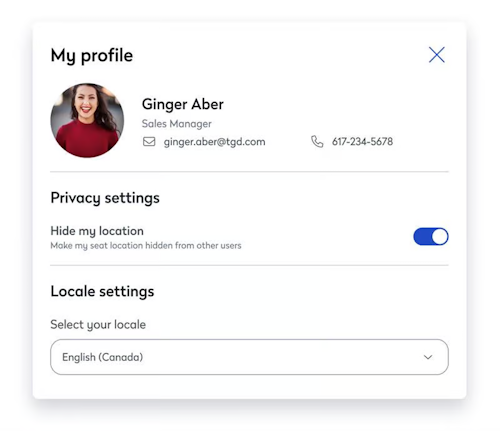
Allow users to manage locale settings directly from their profile without navigating to Web Central, reducing admin dependency and improving day‑to‑day usability. Introducing new privacy controls, users can also manage their visibility by choosing to keep their seat location hidden throughout the app.
Learn more
Archibus Reports Central - Virtual Calculations
Create calculated fields and flexible filters directly in reports so reporting analysts can answer complex questions without exporting data or writing custom queries.
Learn more
- About virtual fields in Calculate Data in the Grid
- About using the AND/OR operators in filters, see Filter the Report's Data

Archibus Maintenance - AI Work Request Summaries
Automatically summarize work request details with AI – including communications, attachments, and activity history, so maintenance teams can understand issues faster and reduce time spent reviewing long request threads.
Learn more
- Explore the Work Request form
- Deploy AI Integration - Before the AI Work Request Summaries can be used, the AI Integration must be completed.
BOMA 2024 Office Standard Support
Calculate rentable area using the latest BOMA 2024 standard (Methods A & B). Outdoor amenities, tenant shafts, and tenant equipment now count as Non-Allocated Tenant Areas; included in a rentable area with no load factor markup. Fully backward-compatible with BOMA 2017.
Learn more

Lease Agreement Onboarding REST API
Enable third-party systems, such as ERP platforms, Lease Management AI tools, and data migration pipelines to automatically push lease, building, and contact data directly into Archibus over a standard REST API. Each call supports bulk upsert with partial success, so valid records are always saved even when others in the same batch fail. Built-in field validation and per-record error reporting give integration teams the feedback they need to resolve issues without manual intervention.
Learn more
- About the Web Central REST API
- Lease Endpoints in Lease - Use Examples
Automated Data Event Log Cleanup
A new scheduled workflow rule automatically archives and purges old records from the data event log, eliminating the need for manual DevOps intervention. Retention periods are fully configurable, with archival defaulting to 14 days and permanent deletion to 365 days.