
Asset and Equipment Registration
Archibus OnSite
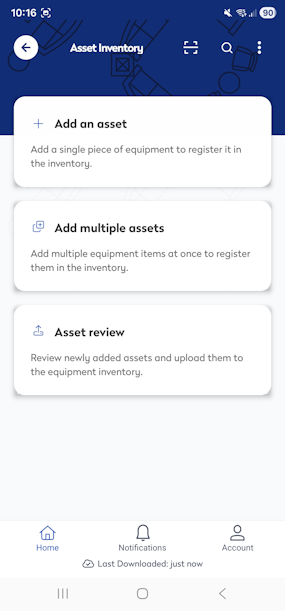
Asset and Equipment Registration allows mobile inventory users to add and register new assets directly in the field. Asset details, such as location, attributes, photos, and identifiers can be captured at the point of discovery, ensuring accurate records from the start.
This reduces gaps in asset visibility by eliminating delayed or incomplete registrations. By enabling real‑time asset creation during site visits, organizations improve data accuracy, reduce administrative effort, and move faster from discovery to maintenance and lifecycle management. This results in a more complete and reliable asset register.
Offline Mode
This module can be used in Offline mode and note that the barcode scanning won’t be there, but you can manually add equipment. When you are online, the equipment can be uploaded to your inventory.
Web Central (v2026.01 and onwards) and Onsite App (v6.5.0 and onwards)

Prerequisites
User Security

Security Group
The user must be part of the security group ASSET-REG-MOB. For more information, see Archibus Administrator and see the following sections:
- Assign mobile apps to user using the "Assign Mobile Apps to Roles" button
- Application and security group requirements
Enable Mobile Users
The user must have the setting "Mobile Device Enabled" turned on; learn more in Archibus Administrator and see the Enable Mobile Users section.