
Start Work on a Service Request (mobile)
iOffice Service Request app
Level: Operator
Remember, you must be an operator assigned to the request before you can start work on the ticket. When you are ready to begin working on a service request ticket, use the following procedure to start work directly in the Service Request App.
-
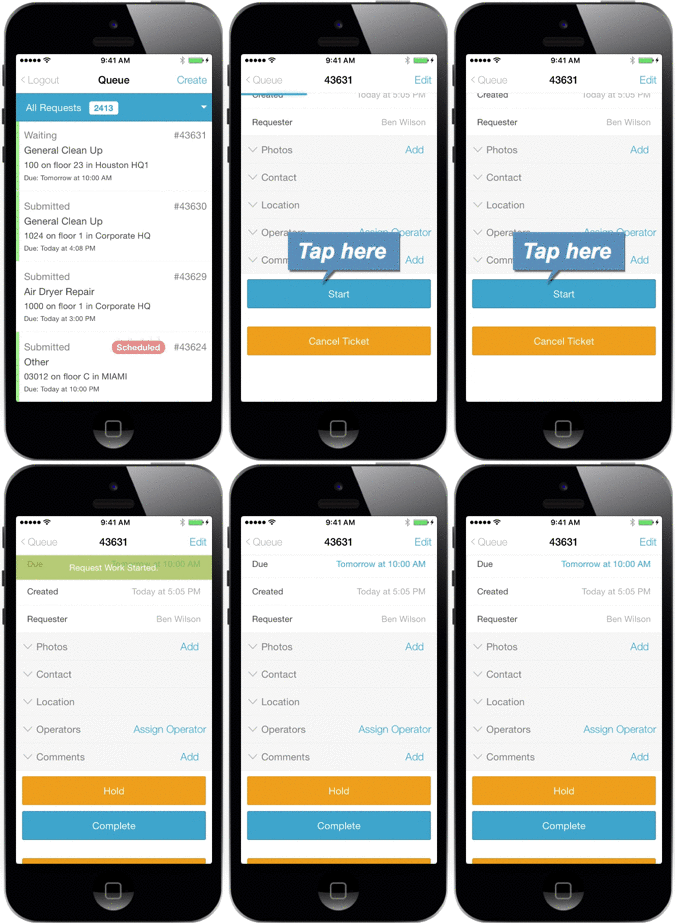
Sign in to the Service Request App. The Queue screen displays.
-
Tap the service request ticket on which you are ready to work on the Queue screen.
-
The Service Request Details screen displays, where you can scroll down to review ticket information.
-
Tap the Start button. A notification message displays to confirm the request has been accepted, and the ticket is marked as In Progress.
-
When you have finished work on the ticket, mark the ticket as Complete or if you are unable to complete work on the ticket and need to move on to a different task, place the ticket on Hold.
-
Tap Queue to return to the Queue screen.