
2026 April Eptura Asset Product Release
April's release includes:
- Performance Improvements - Asset List, Inventory List, PM List, and Work Order List
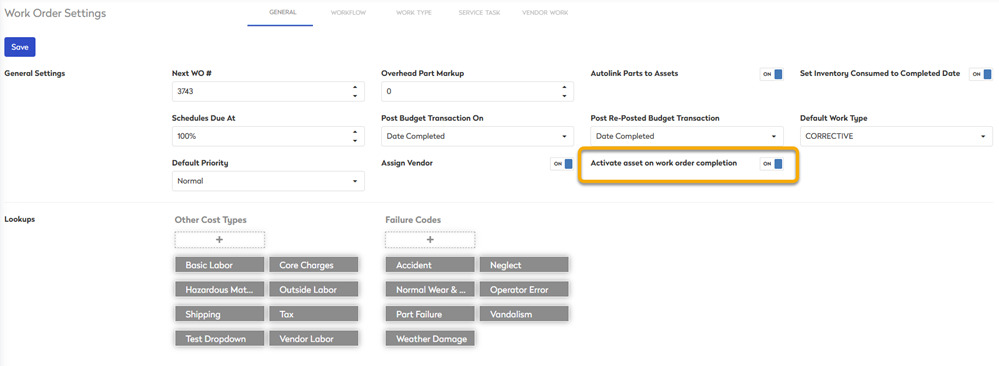
- Asset downtime control on Work Order completion
- Barcode Improvement
- Fleet Connector Reliability (Samsara)
- Customer API Key Management
- General Maintenance
April 16th, 2026 Release
Performance Improvements - Asset List, Inventory List, PM List, and Work Order List
General Availability
When managing large volumes of assets, work orders, or preventive maintenance, even small delays can slow down your operations.
The new user interface and performance enhancements in Eptura Asset introduce redesigned list views and modules, delivering faster load times, improved responsiveness, and a more scalable experience.
These enhancements apply to the Asset, Work Orders, Preventive Maintenance, and Inventory modules.
What's new:
- Batch-based grid loading: Load data in small batches for faster performance and smoother interaction with large datasets.
- Faster detail pages: Quick access to detailed asset and work order records, even in complex hierarchies.
- Advanced filtering & search: Includes column filtering, sorting, global search, dropdown filters, KPI filters, & group tree filtering.
- Customizable layouts: Saved views, column chooser, grid reset, and visual grouping allow users to personalize their workspace.
For customers who had early access, the module will no longer appear as a sub-item under the previous module.
Note that the overall layout and functionality remain the same for users.
Learn more about the list views in:
Asset downtime control on Work Order completion
New setting lets you choose whether completing a Work Order automatically returns a Down asset to Active, or keeps it Down for manual update. This includes API support for downtime status updates.
Learn more in Set up General Settings for Work Orders.
Barcode Improvement
The Part Order Settings is where you can set up the Barcode Labels. The labels now let you include the Vendor Part ID as well as Bin Tree and Description.
Learn more in Set up General Settings for Purchase Orders.

Fleet Connector Reliability (Samsara)
- GPS odometer fallback added when ECU values are unavailable, preventing zero‑value sync issues.
Learn more about the Samsara Connector.
Customer API Key Management
- API keys can now be created and assigned directly from the UI.
Learn more in Create an API Key.

General Maintenance
- Work Order Settings - Corrected the Work Type validation so names longer than the 24-character limit are no longer allowed.
- Inventory Module - Correct the Inventory (v2 beta) so all active parts for a selected warehouse now display correctly.
- Purchase Orders - Resolved an issue where inactive Purchase Orders were still showing under “Open Purchase Orders” in the Part view.
- Invoices - Corrected the invoice date custom field behavior so clearing and saving no longer reverts the date to 12/31/1969.
- Work Orders - Corrected the “Advanced Work Order Search” so it now loads correctly for migrated data.