Set up Parent and Child Assets
You can establish a relationship between your assets, that are in the same location/group. By establishing a Parent/Child relationship between assets, it allows you the possibility of sharing meters/logs, report on combined costs, and share movement history between sites & locations.
Parent Child Assets
This must be enabled in the Marketplace, before this can be used.
Take a Parent Asset and assign a Child Asset
- From the menu, click Assets.
- Click the Asset you want to edit and the Assets Details screen displays.
- Click the Details icon and the Asset Details panel displays.
- Click the Child Assets icon and the panel displays.

- Click the Child Assets + and the Asset search displays.

- You can either search or broswe for an asset.
- Select the asset and it displays as a child asset.

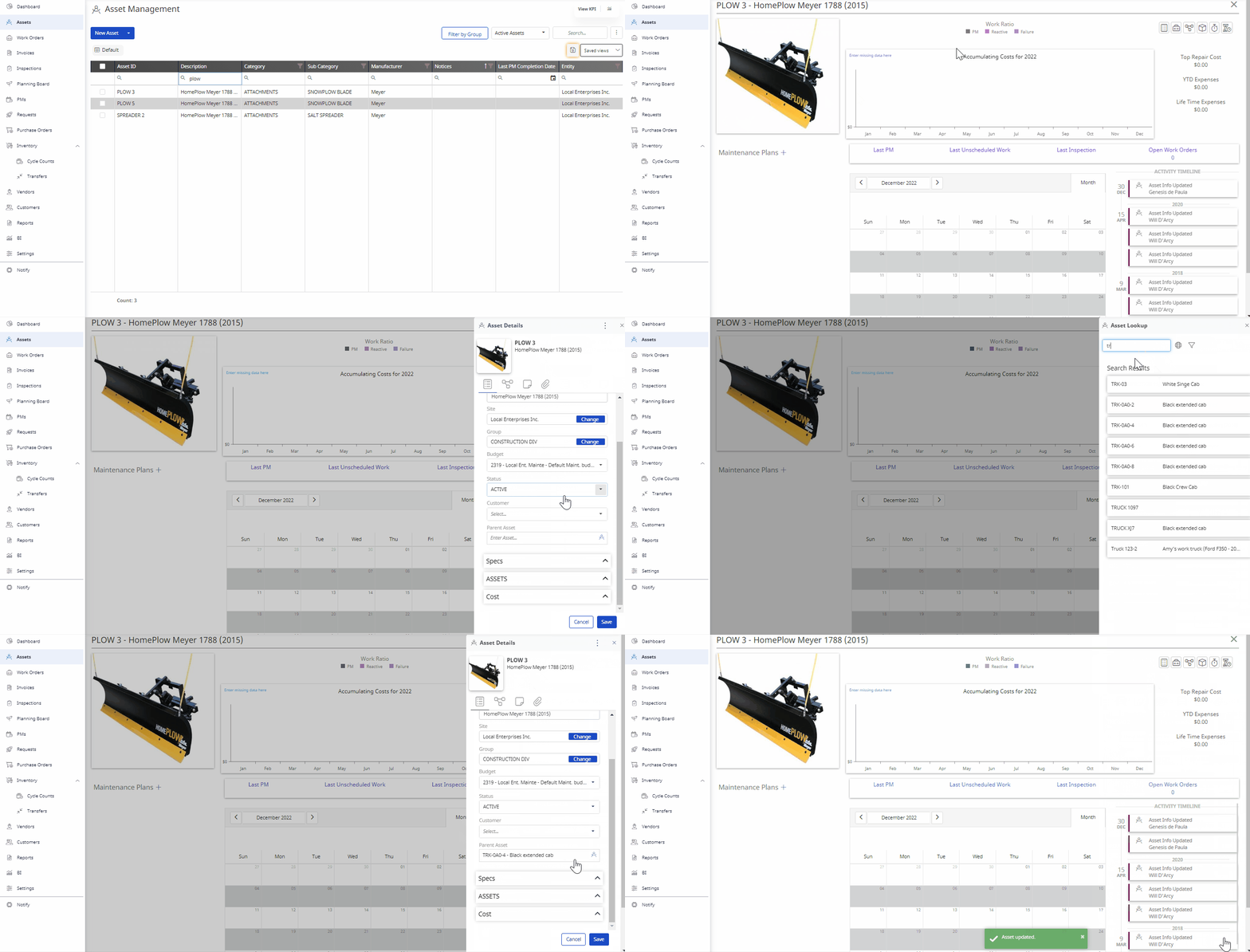
Assign a Child Asset to a Parent Asset
- Click on the asset that will act as the parent asset.
- Click on the asset details icon.
- Scroll down to the Parent Asset field and click on the globe icon
- Search and select the Asset to be named the parent asset.
- Click the Save button at the bottom of the screen