
Report resource issues to Eptura Asset
If your organization subscribes to Eptura Asset, you can report issues with meeting spaces and personal spaces directly to Eptura Asset from Eptura Engage.
Learn more: Eptura Asset knowledge center
About reporting issues with resources to Eptura Asset
Report an issue with an Eptura Engage meeting space or personal space resource and automatically create a work order in Eptura Asset. Issues can be reported from Eptura Engage on the web and the Eptura Engage mobile app.
Users report an issue and create a work order by launching the Report Issue portal from the associated Eptura Engage booking or from the resource details accessed via the booking grids or booking form. The user enters a description of the issue and can add attachments and a URL if useful and the work order is sent to Eptura Asset when submitted.
Learn more:
- Report an issue with a meeting space
- Report an issue with a personal space
- Eptura Asset Work Orders (Eptura Asset knowledge center)
Enabling issue reporting
Your organization must subscribe to Eptura Asset to enable issue reporting.
To enable issue reporting from Eptura Engage to Eptura Asset, first enable the Issue reporting system in Global setup and then get the Eptura Asset work request portal URL from Eptura Asset and add it to each Eptura Engage location.
Global setup
- In the Eptura Engage web app, navigate to Advanced setup > Global setup.
- On the Application tab, scroll down to Menu Options > Issue reporting system and select Eptura Asset.

- Click Save to enable the issue reporting system globally for your organization.
Eptura Asset work request portal URL
- Open Eptura Asset and navigate to Settings > Tools and Support > Portal.
- Select the appropriate portal from the Portal Name drop-down list and click the icon to copy the URL.
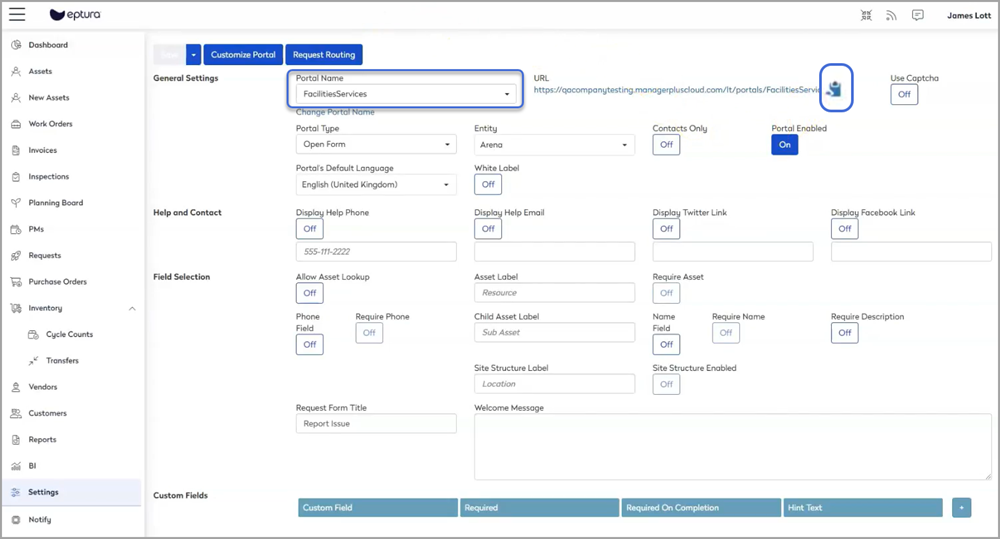
Learn more: Create a Work Request Portal in Eptura Asset
Locations
- Open Eptura Engage and navigate to Application setup > Locations.
- Navigate to the relevant Location to open Location Administration.
- Paste the Eptura Asset work request portal URL into the Asset URL field.

- Click Save to save the location settings.