Listener service
About the Listener service
The Eptura Engage webhook system is called the Listener service. When events happen in Eptura Engage - a booking is created, a space is updated, a visitor is registered, etc. - the system sends a notification payload to a URL you register.
Contents
Reference Enums
The tables show the values used by the Webhooks and Notification service. Use these reference tables to understand the valid values that can be returned in webhook payloads or supplied when configuring listeners.
Event type
Value |
Event type |
Description |
| 0 | Action | Generic action events |
| 1 | Meeting | Meeting space booking events |
| 2 | Desk | Personal space booking events |
| 3 | MeetingExternal | External meeting space events |
| 4 | IPPhone | IP phone events |
| 5 | MeetingProgression | Meeting status progression events |
| 6 | DeskProgression | Personal space status progression events |
| 7 | Resource | Resource change events |
| 8 | Visitor | Visitor management events |
Queue Providers
Value |
Name |
Description |
| 2 | PublishNotificationProvider | Default.HTTP POST to your notificationUr1 |
| 3 | AzureQueueProvider | Writes to an Azure storage queue |
| 4 | AzureQueueFilteredProvider | Azure storage queue with filtering |
For most webhook integrations, use value 2 PublishNotificationProvider. The platform will POST directly to your endpoint.
Authentication
All listener API calls require the same authentication as any other Admin API request. The Postman collection handles this automatically (pre-request script generates the JWT and attaches the subscription key).
If calling manually, then:
Authorization: Bearer <JWT>Ocp-Apim-Subscription-Key: <your-subscription-key>Content-Type: application/json
Webhooks - registering and deleting Listeners
Register a listener
POST /api/V1/listener
Registers a new webhook. You specify which event types to listen for, where to send notifications, and a secret key your endpoint can use to verify that the payload came from Eptura Engage.
Request body
The fields used in the request are explained in the table below.
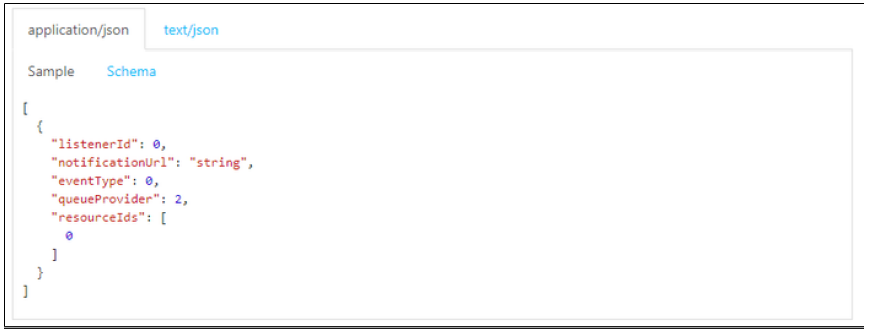
{ "secretKey": "my-shared-secret", "eventTypes": [1, 2], "resourceIds": [], "notificationUrl: "https://your-endpoint.example.com/webhook", "queueProvider": 2 }
Field |
Required |
Description |
|
|
Yes |
A shared secret string. Eptura Engage includes this in notifications, so your endpoint can verify authenticity. |
|
|
Yes |
Array of event type integers. Subscribe to one or more. See the enum reference table above. |
|
|
No |
Array of specific resource IDs to filter on. Leave empty ( |
|
|
Yes |
The public HTTPS URL where Eptura Engage will POST notification payloads. |
|
|
No |
Defaults to |
Example: Subscribe to all meeting and personal space booking events
{ "secretKey": "abc123supersecret", "eventTypes": [1, 2], "resourceIds": [], "notificationUrl": "https://integrations.mycompany.com/condeco/webhook", "queueProvider": 2}
Example: Subscribe to visitor events for specific resources
{ "secretKey": "abc123supersecret", "eventTypes": [8], "resourceIds": [1042, 1043], "notificationUrl": "https://integrations.mycompany.com/condeco/visitor-webhook", "queueProvider": 2}
Response
If successful, Eptura Engage returns the created listener object, including its assigned listenerId. Save this ID - you need it to delete the listener later.
{ "listenerId": 47, "notificationUrl": "https://integrations.mycompany.com/condeco/webhook", "eventTypes": [1, 2], "queueProvider": 2}
Look up an existing Listener
GET /api/V1/listener?notificationUrl=<encoded-url>
Retrieves details for a listener registered against a given notification URL. Useful for checking if a listener already exists, or for retrieving the listenerId if you didn't save it at registration time.
Query parameter
Parameter |
Required |
Description |
|
|
Yes |
The notification URL, HTML-encoded. |
URL encoding
The URL must be percent-encoded. For example:
https://integrations.mycompany.com/condeco/webhookbecomes
https%3A%2F%2Fintegrations.mycompany.com%2Fcondeco%2Fwebhook
Full request example
GET {{baseUrl}}/api/V1/listener?notificationUrl=https%3A%2F%2Fintegrations.mycompany.com%2Fcondeco%2Fwebhook
Response
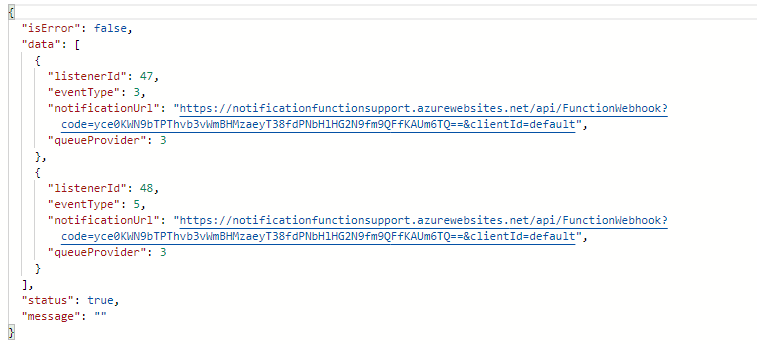
Returns the listener configuration, including the listenerId, event types, and queue provider settings.
Delete a Listener
DELETE /api/V1/listener
Removes a registered Listener so Eptura Engage stops sending notifications to that URL.
Note: Unlike typical REST deletes, this endpoint takes a JSON body (not a path parameter).
Request Body
{ "listenerId": 47, "eventType": 1, "notificationUrl": "https://integrations.mycompany.com/condeco/webhook", "queueProvider": 2}
Field |
Required |
Description |
|
|
Yes |
The ID returned when the Listener was created (or retrieved via GET). |
|
|
Yes |
The event type integer for this Listener. |
|
|
Yes |
The registered notification URL. |
|
|
No |
Queue provider value. Should match what was used at registration. |
Using the Postman collection
All three listener endpoints are in the ExternalBooking folder of the Condeco_AdminAPI_Generic.json collection:
Request name |
Operation |
|
|
Register/subscribe a new listener |
|
|
Look up listener by notification URL |
|
|
Delete/unsubscribe a listener |
Steps:
- Ensure your collection variables are set (
apimHost,customerCmdb,subscriptionKey,audience,clientSecret) - Expand the ExternalBooking folder.
- Select the desired listener request.
- Edit the body (POST/DELETE) or the
notificationUrlquery parameter (GET). - Click Send - the pre-request script handles authentication automatically.
Workflow summary
1. POST /api/V1/listener - Register webhook, note the returned listenerId
2. GET /api/V1/listener?... - Verify it exists / retrieve listenerId later
3. DELETE /api/V1/listener - Unsubscribe using listenerId + notificationUrl
Notes
- Your endpoint must be publicly reachable over HTTPS. Eptura Engage cannot POST to localhost or internal addresses.
- Verify the secret key in your endpoint handler - Eptura Engage includes the
secretKeyin the notification payload, so you can reject spoofed requests. resourceIdsfiltering - if you only care about events for specific rooms or desks, pass their IDs to reduce noise. Leave empty for all resources.- Multiple event types per registration - a single POST can subscribe to multiple event types (e.g., [1, 2, 8]). Each event type may appear as a separate listener entry when retrieved.
- The
listenerIdis per-event-type - if you subscribed to [1, 2], you may get back two listener IDs, one per event type. You will need to delete each individually.