
Launch the Eptura Engage mobile app from a third-party app
The Eptura Engage mobile app can be opened directly from another app installed on an iOS or Android mobile device, either by using a URL scheme or a URL link to the app. Follow the steps for your device to configure a source app to open the Eptura Engage mobile app.
iOS
Method 1: URL Scheme
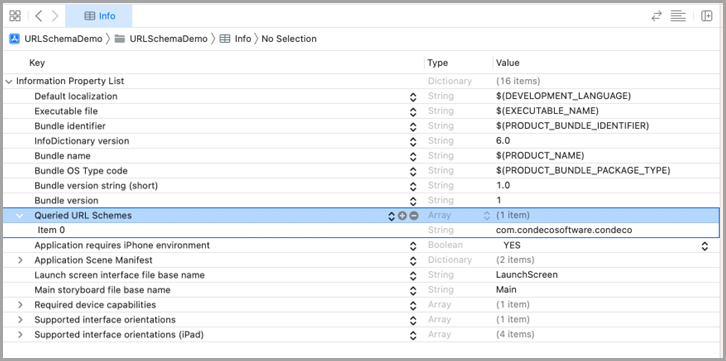
Open the Info.plist file for the source application and add a new Queried URL Schemes key for Eptura Engage:
Value: com.condecosoftware.condeco
Use the following code sample to open the Eptura Engage mobile app from the source app:
if let url = URL(string: "com.condecosoftware.condeco://")  {
    if UIApplication.shared.canOpenURL(url) {
       UIApplication.shared.open(url, options: [:], completionHandler: nil)
       print(url)
    } else {
       print("not found") //Can use URL(string: "itms-apps://itunes.apple.com/app/id1565099537") to open App store
    }
} else {
    return
}
Method 2: URL app link
A web browser, or a third-party app such as Microsoft Outlook, can launch the Eptura Engage mobile app using the following URL:
https://condecoapp.condecosoftware.com/
For example:
if let url = URL(string: "com.condecosoftware.condeco://") {
            if UIApplication.shared.canOpenURL(url) {
                UIApplication.shared.open(url, options: [:], completionHandler: nil)
                print(url)
            } else {
                guard let appURL = URL(string: "https://apps.apple.com/us/app/eptura-engage/id1565099537") else {
                    print("not found")
                    return
                }
                UIApplication.shared.open(appURL, options: [:], completionHandler: nil)
            }
        } else {
            return
        }
Android
Method 1: URL Scheme
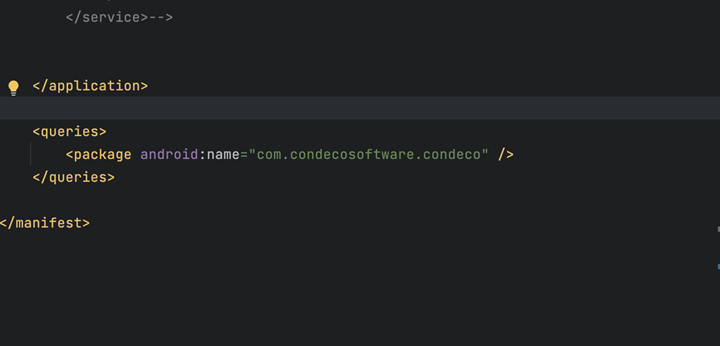
Open the AndroidManifest.xml file from the root folder of the source application and add the following:
<queries>
<package android:name="com.condecosoftware.condeco" />
</queries>
Use the following code sample to open Eptura Engage mobile app from the source App:
val packageName = "com.condecosoftware.condeco"
var intent = activity.packageManager.getLaunchIntentForPackage(packageName)
          if (intent == null) {
            if (intent == null) {
                    intent = try {
                        Intent(Intent.ACTION_VIEW, Uri.parse("market://details?id=$packageName"))
                    } catch (e: Exception) {
                        Intent(Intent.ACTION_VIEW, Uri.parse("https://play.google.com/store/apps/details?id=$packageName"))
                    }
                }
             startActivity(intent)
Method 2: URL app link
A web browser, or a third-party app such as Microsoft Outlook, can launch the Eptura Engage mobile app using the following URL:
https://condecoapp.condecosoftware.com/
For example:
val intent =  Intent(Intent.ACTION_VIEW,"https://condecoapp.condecosoftware.com".toUri())
startActivity(intent)