Microsoft Intune authentication for the mobile app
Global settings apply throughout your organization.
| Coming soon!
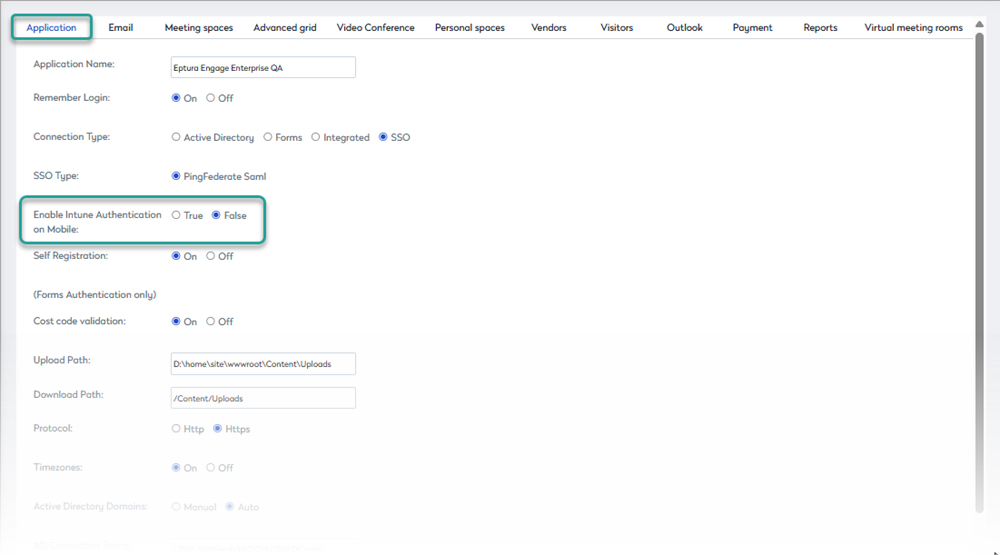
User authentication via Microsoft Intune for the Eptura Engage mobile app is expected Q3 2026 We're adding a global setting that allows admins to enable Intune-based authentication for the Eptura Engage mobile app. When enabled, the app uses Microsoft's secure authentication broker; when disabled, it falls back to standard in-app web view sign-in. Intune-based authentication for the Eptura Engage mobile appUser authentication via Microsoft Intune can be enabled globally for your organization.
Before you startBefore enabling Intune authentication, ensure that all users who will access the Eptura Engage mobile application are present in Microsoft Entra ID, either natively or through directory synchronization or federation.
Enable user authentication via Microsoft IntuneFollow the steps to enable or disable user authentication via Microsoft Intune
Learn more: Microsoft Intune
|