
2026 June Eptura Engage Mobile App - Android and iOS Product Release
General availability: June 11, 2026
Version: Android 4.18.0 | iOS 4.18.0
Updates:
Updates
Swap personal space booking
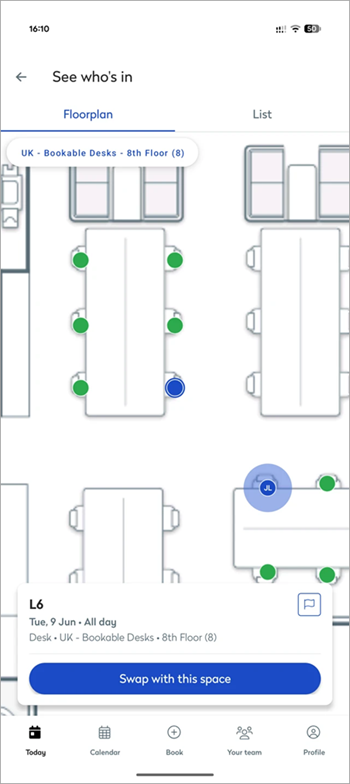
Users can now swap their booked personal space from the Today or See who’s in screens.
If you have a personal space booked for today, the Swap this space option appears on the Today screen. Selecting this opens the floor plan, where you can choose a different space. Tap Swap with this space to confirm - the booking is moved to the new space and the original space is released for others to book.
You can also tap See who’s in to open the floor plan and view both your booking and your colleagues’ locations. From here, select a more convenient space and tap Swap with this space to confirm.
The swap option is also available when scanning a QR code to check in.
Calendar redesign

The calendar has been refreshed with an updated design, including a new status switcher for In office, Remote, and Off. The team presence view has been simplified, now displaying overlapping avatars for a clearer, more compact layout, along with an updated button arrangement.
To reduce noise on non-working days, team member presence is hidden when a user’s status is set to Off.
Enhancements and general maintenance
Enhancements
ID |
Description |
|
CUMA-9224 / CUMA-9225 |
Android & iOS | The Privacy Policy link is now displayed on the login screen, giving users easy access to Eptura's privacy policy before signing in. When logged in, the Privacy Policy can be accessed via the user profile as before. |
|
CUMA-9359 / CUMA-9383 |
Android & iOS | The booking confirmation screen has been updated with an improved design - the tick animation is now larger, date and time are displayed in bold, and the workspace type is shown as a dedicated line rather than embedded in the header text. |
|
CUMA-9353 / CUMA-9354 |
Android & iOS | The login flow now supports Conditional Access (CA) policy-compatible authentication, ensuring organizations with strict identity and device compliance policies can authenticate via SSO. |
|
CUMA-9364 / CUMA-9365 |
Android & iOS | The app now implements database encryption when Microsoft Intune policies are applied, ensuring local app data meets your organization's mobile device management compliance requirements. |
|
CUMA-9422 |
iOS | The SSO login now uses ASWebAuthenticationSession in place of Safari, providing a more secure and reliable single sign-on experience that aligns with Apple's authentication guidelines. |
General maintenance
ID |
Description |
|
CUMA-9213 |
iOS | When using the Magic Link login flow and selecting Open Email App > Gmail, a 'Failed to open link' error was displayed. This has been fixed and users are now redirected to Gmail without error, allowing the Magic Link login to proceed normally. |