
Report an issue with a meeting space
If you find a problem with your meeting space, you can report it via the booking using the Eptura Engage web app or mobile app. If you want to report an issue but do not have a booking for the space today, you can report it from one of the booking grids using the web app - and if you have ServiceNow integrated, you can report it from the Report Issue dashboard.
To report an issue with a meeting space via Eptura Engage, your organization must either subscribe to Eptura Asset or be integrated with ServiceNow. Learn more (admins): Issue reporting system
Contents
- Report an issue via a booking
- Report an issue via the booking grids - when you do not have an active booking
If your organization uses ServiceNow, you can also submit issues directly from Eptura Engage and raise an incident ticket in ServiceNow:
- Report Issue from the Report Issue dashboard (web app) ↗️
- Report issues from the Report Issue option (mobile app) ↗️
Report an issue via a booking
If you have a booking for the meeting space today, you can report an issue using the Eptura Engage mobile app or Eptura Engage web app, via the booking.
You can also report an issue by starting a new booking and selecting the meeting space from the search results.
Eptura Engage mobile app
You can report an issue with a meeting space by opening an existing booking from the Calendar, or by starting a new booking and searching for the meeting space.
- Open an existing booking, or start a new booking and search for the meeting space you want to report an issue with.
- Existing booking: Tap the booking from the Calendar to show the booking details screen.
- Search results: Tap the meeting space to show the booking details screen.
- Tap the Report issue flag icon under the booking details to open the 'Report Issue' screen.
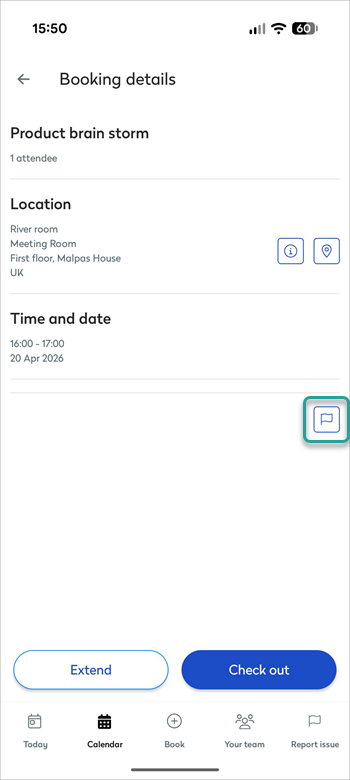
- Enter details about the issue and complete the form as required - the fields and options on the Report Issue form depend on your organization's configuration and the reporting system in use, either Eptura Asset or ServiceNow:
Reporting an issue with Eptura Asset enabled:

Reporting an issue with ServiceNow enabled:
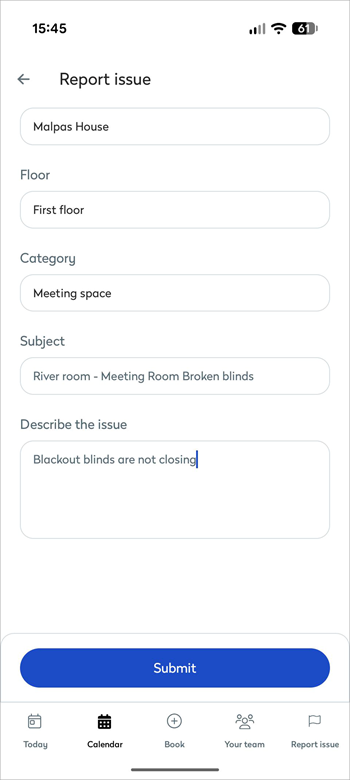
- Tap Submit to report the issue.
Depending on your organization's configuration, submitting the report will either send a work order to Eptura Asset or create an incident ticket in ServiceNow. If ServiceNow is integrated, you can check the status of the corresponding incident from the Report Issue dashboard on the Eptura Engage web app.
Eptura Engage on the web
When you have a booking for the meeting space on the current day, you can report an issue from your booking listed on the Today page or Your bookings. Alternatively, search for the meeting space by starting a new booking and select the meeting space from the search results - then you can report the issue from the meeting space details window.
- Click the report issue flag from the a) Today page or b) Your bookings, or if creating a new booking, click the Report issue button from the c) Meeting space details window:
a) Today pageOn the Today page, your bookings for the current day are listed under Today's bookings. The Report issue flag is to the right of the booking.
Learn more: Today page from Eptura Engage on the web |
b) Your bookingsOpen Your bookings from the Meeting spaces menu on the left. The Report issue flag is to the right of bookings for the current day.
Learn more: Your bookings |
c) Meeting space details windowStart a new booking and select the meeting space from the search results to open the meeting space details window. The Report issue button is at the bottom of the window.
|
|


- The Report Issue form is displayed - the fields and options on the form depend on your organization's configuration. Enter the issue with the space in the Description box. The Subject line is pre-filled with the workspace name - the workspace type and location might also be added. Add attachments and a link to a website if useful (Eptura Asset customers only).
Reporting an issue with Eptura Asset enabled:

Reporting an issue with ServiceNow enabled:

- Click Submit when done.
Depending on your organization's configuration, submitting the report will either send a work order to Eptura Asset or an incident ticket to ServiceNow. If ServiceNow is integrated, you can check the status of the corresponding incident from the Report Issue dashboard on the Eptura Engage web app.
Report an issue via the booking grids
If you do not have an active booking for the meeting space today or are not creating a new booking, you can report an issue from one of the booking grids for meeting spaces using the Eptura Engage on the web.
If ServiceNow is integrated, you can report issues without an active booking from the Report Issue dashboard on the Eptura Engage web app.
- Open the Booking grid or the Advanced grid from the Meeting spaces menu on the left.
- Use the filters at the top to show the meeting spaces in the relevant location and group, and select the workspace type to narrow the list down further.
- From the Booking grid or Advanced grid, click the meeting space to report an issue with. The meeting space details window is displayed.
- From the meeting space details window, click Report issue to open the Report Issues window.
- Enter the problem in the Description box. The Subject line is pre-filled with the meeting space name, type, and location. Add attachments and a link to a website if useful.
Reporting an issue with Eptura Asset enabled:
Reporting an issue with ServiceNow enabled:
- Click Submit when done.
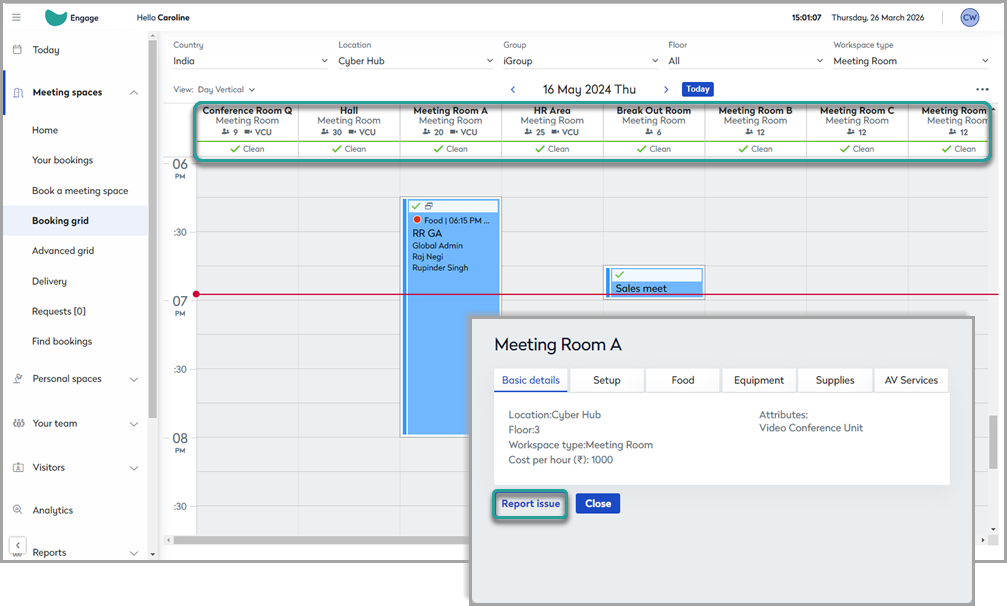

Depending on your organization's configuration, submitting the report will either send a work order to Eptura Asset or an incident ticket to ServiceNow. If ServiceNow is integrated, you can check the status of the corresponding incident from the Report Issue dashboard on the Eptura Engage web app.
Report issues from the Report issue module
If your organization has integrated ServiceNow, you can report issues with meeting spaces and personal spaces, or other assets managed by ServiceNow, from the Report Issue dashboard in the Eptura Engage web app or the Report Issue option in the Eptura Engage mobile app. Submitting an issue from Eptura Engage creates an associated incident ticket in ServiceNow.
- Report issues from the Report Issue dashboard (web app) ↗️
- Report issues from the Report Issue option (mobile app) ↗️