
Transitioning from EWS to Graph API
Microsoft has announced an End of Life (EOL) notice for Exchange Web Services (EWS) and has confirmed that EWS will be disabled in Exchange Online on October 1, 2026.
Learn more: https://learn.microsoft.com/en-us/ex...xchange-online
This change affects Eptura customers using Exchange calendar services with Eptura (Condeco) Room Screens v2 devices. If your organization uses Exchange calendar services with Eptura (Condeco) Room Screen v2 devices, you must transition to Graph API to ensure no loss of service.
To assist with this process, we have developed a migration path from EWS to Graph API that is expected to begin from January 22, 2026. The required firmware update will be rolled out in batches from this date, but customers can contact Support to request a preferred slot. From March 16, 2026, the 8.4.7 update will be rolled out to all remaining devices.
Devices must be running the minimum firmware version 8.3.3 to receive the update to 8.4.7
When devices are running version 8.4.7, customers can authenticate the devices for Graph API.
Prerequisites
The following is required before transitioning to Graph API:
- Microsoft Exchange Online enabled.
- If using OAuth-Delegate authentication: You need the Microsoft 365 calendar URL and email address for the associated room mailbox.
- If using OAuth App-Only authentication: Your Client ID, Tenant ID, and Client secret are required to enable OAuth App-only for your calendar service in the Device Hub.
- Eptura (Condeco) Room Screen v2 must be running at least version 8.3.3 to receive the required firmware update to version 8.4.7.
- ⚠️Entra ID: ️If using Entra ID, read/write must be enabled for MS Graph API before enabling the calendar service.
The migration process
The migration path simply involves Eptura sending a firmware update to the customer's Eptura (Condeco) Room Screen v2 devices to enable Graph API capabilities, and then the customer re-authenticates the devices with Graph. The included backtrack functionality allows the devices to continue running on EWS after upgrading the firmware, until the device is authenticated with Graph.
The process is as follows:
- Eptura deploy the latest firmware version to the device; version 8.4.7 or above.
- Customer re-authenticates the device with Graph using one of two methods:
- OAuth-Delegate: Authenticate devices one by one. This is the default setting for Eptura room screen devices.
- OAuth App-Only: Enables all devices connected to a particular calendar services to be authenticating at the same time.
To ensure no loss of service, all Eptura (Condeco) Room Screen v2 devices must be authenticated with Graph before October 1, 2026.
How to authenticate using the OAuth-Delegate method
By default, devices are set to use the OAuth-Delegate method for authentication. To use this method and authenticate devices one by one, follow these steps: Authenticate a meeting room screen for OAuth
How to authenticate using the OAuth App-Only method
To enable OAuth App-Only authentication and authenticate all devices at the same time, first ensure that all devices connected to the calendar have successfully upgraded to the latest firmware version (8.4.7 or above). See Prerequisites
When all devices have successfully updated to the correct firmware (see Prerequisites), follow these steps: Enable OAuth for the calendar service
No OAuth App-Only option? Contact Support to enable the OAuth App-Only method for your organization.
FAQ
Transitioning to Graph API
Browse the frequently asked questions to understand more about the migration.
- Which devices are affected by this change?
Only Eptura (Condeco) Room Screens v2 devices (using Exchange calendar services) are affected. Other Eptura devices are unaffected as they are already configured to use Graph API. - Can we authenticate all screens in bulk?
Yes, using the OAuth App-Only method. Bulk authentication is not possible using the OAuth-Delegate method. OAuth App-Only authentication allows access to data without a signed-in user, and allows all screens to authenticate at the same time. You will need to enter your Client ID, Tenant ID, and Client secret when selecting OAuth App-Only authentication: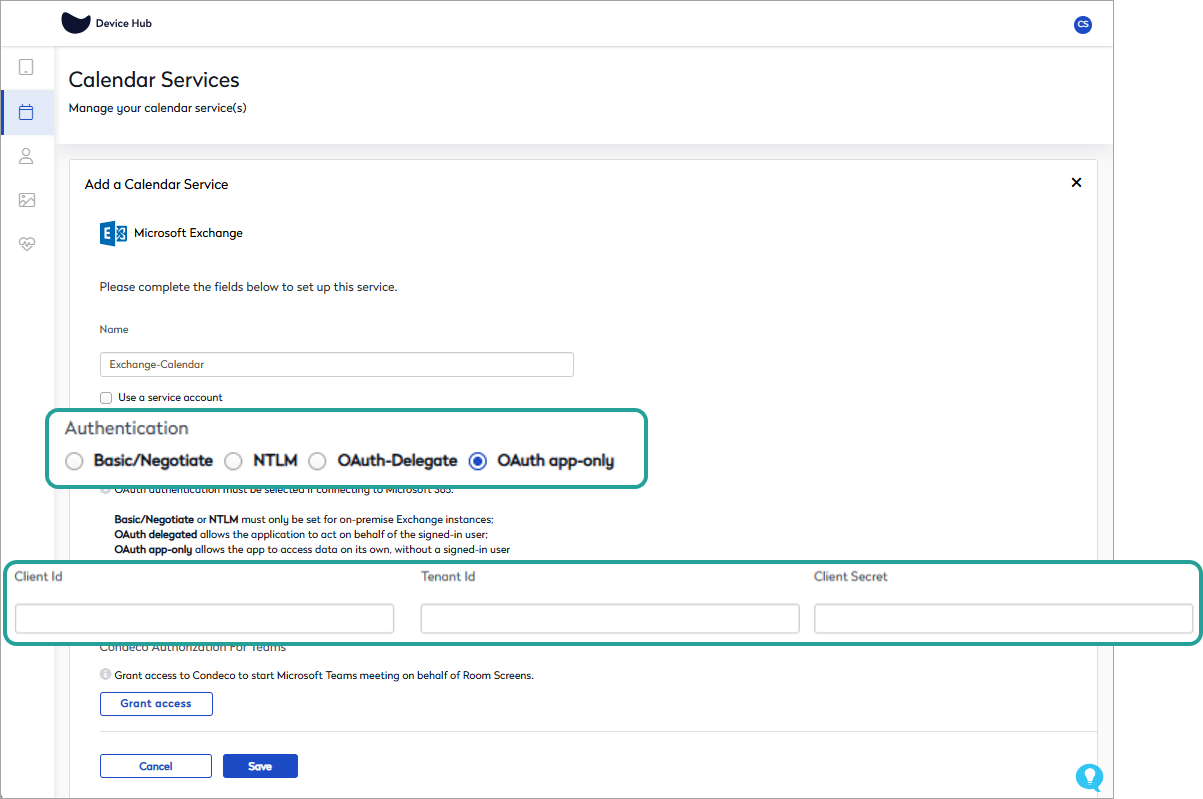
Learn more: Enable OAuth for the calendar service - Will devices experience downtime during the transition to Graph?
After the firmware update, the included backtracking technology enables devices to continue working with the existing EWS connection until the customer authenticates a device using either the OAuth-Delegate or OAuth App-Only method. However, when using the OAuth App-Only method, devices that have not successfully upgraded to firmware version 8.4.7 (or above) might experience downtime.
Ensure all devices connected to the calendar have successfully upgraded to the latest firmware version (8.4.7 or above) before authenticating using OAuth App-Only.
- What is the difference between OAuth-Delegate and OAuth App-Only?
The OAuth-Delegate method requires devices to be authenticated one by one. The OAuth App-Only method allows all devices connected to a particular calendar service to be authenticated at the same time. - How long does it take for devices to adopt Graph API when authenticated?
Changes are applied as soon as the device receives the IoT call following a successful authentication. - What actions are required by the customer to transition Eptura (Condeco) Room Screen v2 devices to Graph?
Ensure devices meet the prerequisites and then authenticate devices as described above in the Migration process -
How long will it take for thousands of devices to authenticate in bulk using the OAuth App-Only method?Based on previous performance tests, processing IoT messages for calendar setting changes across 20,000 screens takes approximately 2 hours
-
How long will devices remain functional without re-authentication?Devices will continue to function normally until Microsoft disables EWS, which is scheduled for October 1, 2026. Learn more: https://learn.microsoft.com/en-us/ex...xchange-online
General FAQ about OAuth authentication
-
Does a screen need to be authenticated again if deactivated and reactivated?
Yes. Learn how to authenticate a room screen for OAuth -
Is OAuth authentication available for on-premise Exchange environments?
Microsoft no longer supports on-premise Exchange environments. Customers must upgrade to OAuth to prevent any interruption or loss of service to Eptura devices. - What access is agreed to during the meeting room screen authentication process?
When you accept the Microsoft permissions request during the room screen authentication process, you consent for access to the room mailboxes as the signed-in user via Exchange Web Services (EWS), and for Graph API to sign in and read the room user profile.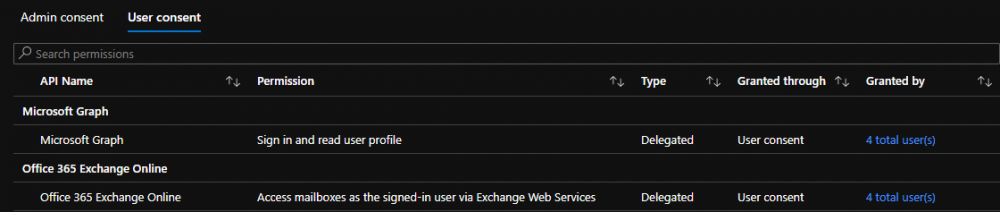
User consent granted for OAuth authentication
Learn more about providing consent for Microsoft 365 accounts at Microsoft https://docs.microsoft.com/en-us/microsoft-365/admin/misc/user-consent?view=o365-worldwide -
What is the lifetime of the access token?
Unless otherwise configured by the AD admin, the default lifetime of the access token is 3599 seconds. -
What happens when the token expires?
When the access token has expired and the screen attempts an operation with Exchange, it will receive the 401 (not authorized) error. A new token is fetched and the operation completed. -
What happens if the service account is deleted, locked or the password changed/expired?
All screens using the service account must re-authenticate. Learn how to authenticate a meeting room screen for OAuth -
What happens if the email address of the Exchange room changes?
All screens will show as unauthenticated in the Device Hub. Learn how to authenticate a meeting room screen for OAuth to apply the new email address. -
Can OAuth authentication be performed in bulk?
Yes, using the OAuth app-only method. Bulk authentication is not possible using the OAuth-delegate method. OAuth app-only authentication allows access to data without a signed-in user, and allows all screens to authenticate at the same time. -
What happens if an incorrect mailbox is entered during the authentication process?
Authentication will fail and the portal displays the error ‘The last authentication attempt failed due to access token received of different resource’.
Good to know
- OAuth authentication is not compatible with on-premise Exchange. Microsoft no longer supports on-premise Exchange environments. Customers must upgrade to OAuth to prevent any interruption or loss of service to Eptura devices.
- Switching from OAuth to Basic authentication is not supported. When a room or device has been authenticated to OAuth, it cannot be reverted to Basic authentication.
- If a device is inactive for approximately 90 days or more without connectivity, it will need to be re-authenticated.