
Report Issue dashboard
About the Report Issue dashboard
If your organization has ServiceNow, you can report issues with meeting spaces and personal spaces, or other assets managed by ServiceNow, from the Report Issue dashboard in the Eptura Engage web app as explained below, or the Report Issue option in the Eptura Engage mobile app. Submitting an issue from Eptura Engage creates an associated incident ticket in ServiceNow.
How to report an issue from the Report Issue dashboard
Report an issue from the Report Issue dashboard to automatically create an associated incident ticket in ServiceNow.
- Sign in to the Eptura Engage web app and click Report Issues from the left module menu.

- Complete the fields as follows:
- Location: Select the location from the drop-down list. Only locations that have Report Issue enabled are shown.
- Floor: Select the floor where the resource or asset is located.
- Category: Select the ServiceNow category for the affected resource or asset.
- Subject/Resource name: Enter a short description. If the issue is with an Eptura Engage resource - include the name of the meeting space or personal space. Note - this is the only description (free-text) field that is visible on the submitted reports list in Eptura Engage.
- Briefly describe the issue: Enter details about the issue. Note - this field is not visible in Eptura Engage after submitting the report.
- Click Submit to create an associated incident ticket in ServiceNow.
Submitted reports
Submitted reports and their statuses are listed at the bottom of the Report Issue dashboard in the Eptura Engage web app. Users - including administrators - can only see reports they have submitted themselves. The status reflects the current state of the ServiceNow incident.
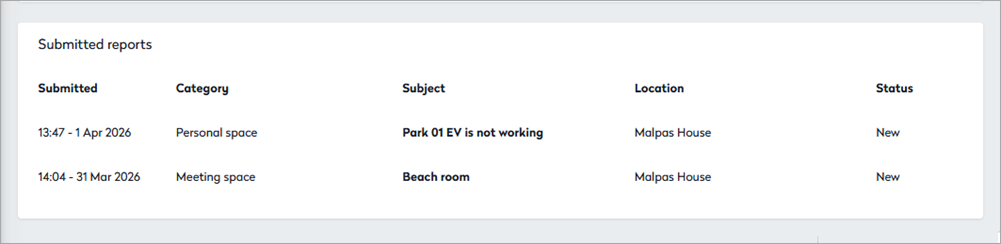
When an associated incident is created in ServiceNow, the following fields are updated:
Eptura Engage Report Issues field |
ServiceNow Incident field |
Notes |
|---|---|---|
|
User's email address |
Caller (full name) |
The email address of the Eptura Engage user must match a ServiceNow user, otherwise the field is left blank. |
| Location |
Location |
The name of the location must exactly match the Eptura Engage location. |
| Floor | Appended to the Short description value. | |
| Category | Category | Selectable list pulled from ServiceNow. |
| Subject + Floor | Short description |
The subject is the only descriptive field that is shown in the submitted reports list in Eptura Engage. Recommended: Include the resource name. |
| Briefly describe the issue | Description | The text entered here is passed to ServiceNow but is not visible in the submitted reports list in Eptura Engage. |
| Status | State | The status value in the submitted reports list in Eptura Engage updates when the State value changes in ServiceNow. |
| n/a | Contact type | The Contact type value is 'Eptura Engage' for all incidents created via Eptura Engage. |
Learn more
Issues can also be reported directly from an existing booking:
Admin guides
See how to configure ServiceNow and enable the Issue reporting system in Eptura Engage:
If your organization is using Eptura Asset, see Report issues to Eptura Asset