
User Provisioning and SSO Overview
User Provisioning
User provisioning automatically synchronizes users from your Active Directory (AD) to Eptura Visitor. When people are added, updated, or removed in AD, the corresponding changes are automatically reflected in the Eptura Visitor user list. For example, when a new person is added to AD, they are automatically added to the Users list in Eptura Visitor.
Synchronizing users is especially useful for keeping the host list up to date in the Eptura Visitor Kiosk app. Visitors can then easily select their host during check-in, and hosts can receive visitor notifications by email and SMS.
User Provisioning Options
Single Sign-On
Single Sign-On (SSO) allows users to sign in to multiple applications using the same username and password. Users authenticate once through their identity provider (IdP) and can then access applications, including Eptura Visitor, without signing in again. Eptura Visitor supports the SAML 2.0 standard for SSO.
In Eptura Visitor, SSO is most useful when staff regularly need to pre-register visitors. If users only need to receive notifications when their visitors check in, SSO is generally not required.
Single Sign-On Options
Manage both User Provisioning and SSO
Many combinations are possible:
- Manage both User Provisioning and SSO with the same vendor (e.g. OneLogin or Okta)
- Only use User Provisioning
- Only use SSO
- Combine different options (e.g. User Provisioning and SSO through SAML)
If your user provisioning or SSO provider is not listed, contact Eptura Support. We can usually deploy support for new providers quickly.
Alternatives to User Provisioning and SSO
Many of our customers choose not to implement User Provisioning and SSO.
In particular, many use an Excel upload to create, invite, edit, or delete users in bulk.
For this, click Employees, and then Bulk upload to launch the bulk upload wizard.
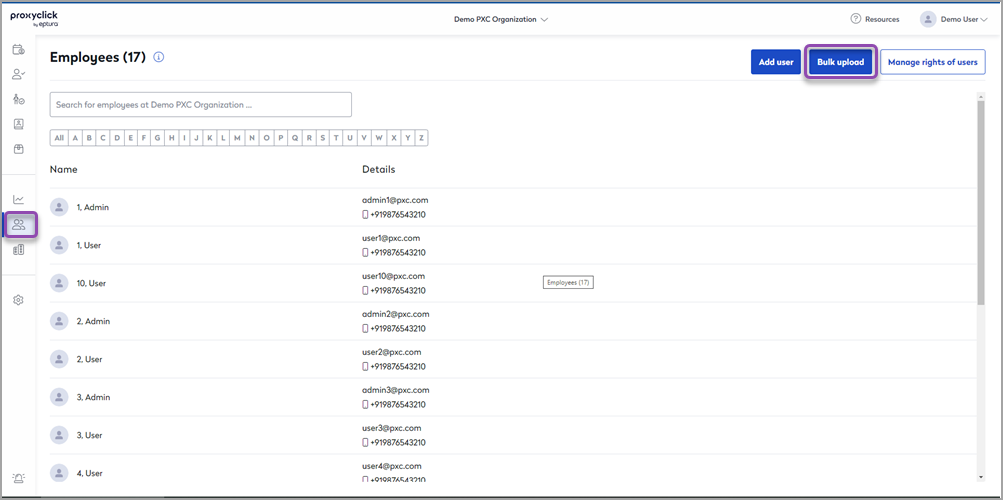
The Excel upload manages account creation, edits, and deletions (user provisioning) and allows you to invite employees in bulk (can replace SSO).
You can also create, manage, delete, and invite users, one by one.
- Click Add Employee to create/invite users.
- Click an individual user's profile to edit or delete them.