
Import Group Data
Eptura - Directory
Level: Administrator
Your Administrator can upload the group data into the directory.
Step 1. Open the Group data import panel
- From the Home screen, click the Directory tool and the Directory screen displays.
- Click the Groups tab.
- Click the New groups drop-down.

- Select the Import group data and the Group data import panel displays.

Step 2. Download and prepare the file
- Click the sample_file.xlsx button and the file is downloaded.
- Navigate to the downloads folder and open the file.
- Complete the data in the spreadsheet and the Group Data Requirements and Business Rules for the standard fields are listed below.

Step 3. Upload your file
- In the Upload your file area, either: drag and drop the file onto the area OR click the Browse file link to browse to the file and select it. Then the file uploads.
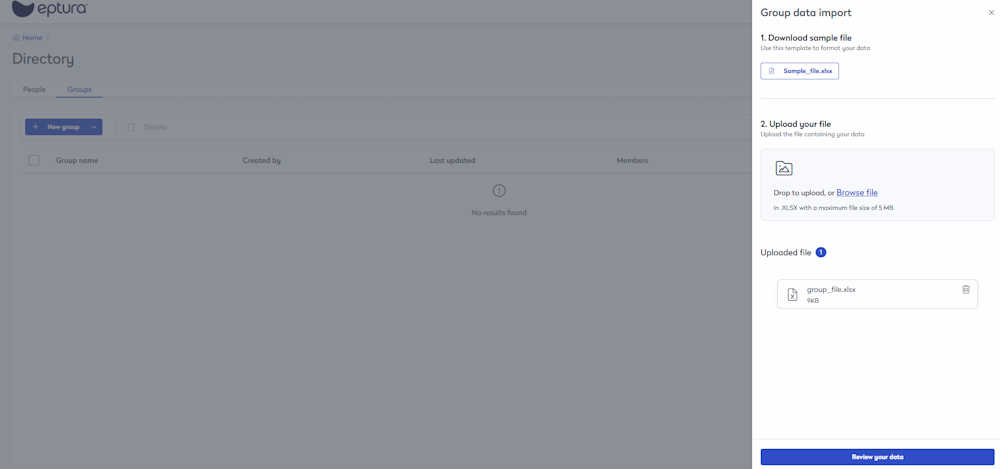
- Click the Review your data button.

- Click the Complete import button. The file import starts and you will see a notification with the message "Upload Completed and (number) group created successfully.
Group Data Requirements and Business Rules
This table lists the standard fields and the business rules.
| Field Name | Required Field | Business Rules |
|---|---|---|
|
Group_Name |
Yes |
A group name that exists in system or you can create a new group. |
|
Description |
No |
Enter the group's description. |
|
Eptura Asset |
No |
This gives the group app access to Eptura Asset. From the drop-down, select either No or Yes. Expected value Default = No |
|
Eptura Engage |
No |
This gives the group app access to Eptura Engage. From the drop-down, select either No or Yes. Expected value Default = No |
|
Eptura Visitor |
No |
This gives the group app access to Eptura Visitor. From the drop-down, select either No or Yes. Expected value Default = No |
|
Envision |
No |
This gives the group app access to Eptura Envision. From the drop-down, select either No or Yes. Expected value Default = No |
|
Devicehub |
No |
This gives the group app access to Eptura Device Hub. From the drop-down, select either No or Yes. Expected value Default = No |
|
New Group_Name |
No |
If you want to rename a group then enter the new group name. |
|
Delete |
No |
From the drop-down, select either No or Yes. Expected value Default = No |