
Device Hub Overview
Eptura - Device Hub
Deploy, manage, and monitor all your physical devices from the Device Hub
Deploy
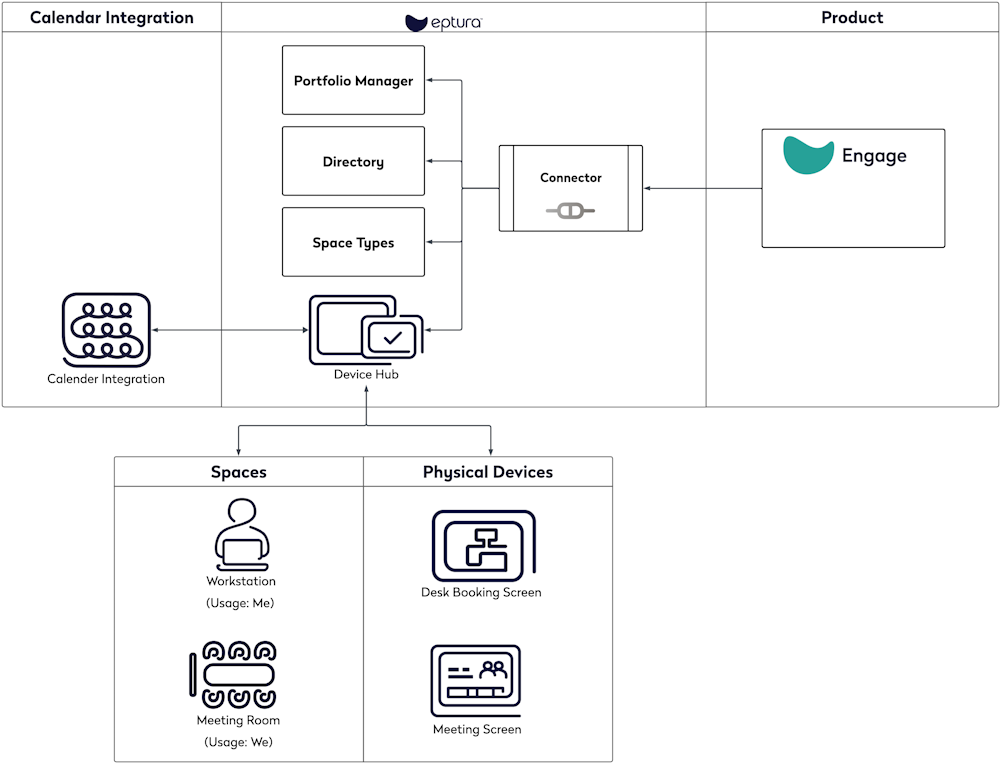
The Device Hub is your central hub where you can efficiently deploy the following.
| Deploy | Physical Devices |
|---|---|
|
Rooms and Screens The Room Screen's physical devices are connected and activated to the spaces that are your Boardroom, Conference, Meeting Room, etc. Spaces are set up and managed in the Portfolio Manager. |
|
|
Desks and Screens The Desk Screen's physical devices are connected and activated to the spaces that are your Offices and Workstations are set up and managed in the Portfolio Manager. |
Manage
The Device Hub is your central hub where you can manage the following:
- Screen Settings
When you have profile(s) created, then these can be applied to the desk screens and room screens. These let you quickly adjust settings for screen activity, time format, security, RFID card types, and so much more.
- Themes
When you have themes created, they can be applied to your Room Screen devices; you can use a Global Theme across all devices.
- Calendar Integration
The calendar integration available is the Engage Calendar Service, and this is connected in the Calendar Services.
The calendar services that can be set up are Mircosoft Exchange and Goolge Rooms | Eptura Engage Knowledge Center
Monitor
The Device Hub is your central hub where you can monitor your device's health.
- Device Health
Administrators can monitor the health of the Room Screen devices, and there are email notifications that you can sign up for to receive daily emails.