
Add or Edit Buildings
Add a Building
- From the Home screen, click Portfolio Manager and the All Locations screen displays.
- Click the Buildings tab.
- Click the + Add Building button and the Add Building form displays.
- Complete the fields, see below for the Building Fields.
- Click the Save button.

Edit a Building
- Use the All Locations navigation to navigate to the site and the buildings display in the list.
- For the building you want to edit, click the Edit
 icon and the Edit Building form displays.
 - Complete the fields, and see the table below for the Building Fields.
- Click the Save button.
Building Fields
Overview Tab
| Fields | Description |
|---|---|
| Building Status |
Select either:
|
| Building Name | Enter the name of the building. |
| Building Code | Enter the code for the building. |
| Building Type | Select the building type from the default list. This list is defined by Eptura. |
| Site | Select the site from the list and, if needed, you can use this to move the building to a different site. |
| Description | Enter a short description of the building. |
| Notes | Enter notes for the building. |
Location Tab
| Fields | Description |
|---|---|
| Address 1 | Enter the address of the building. |
| Address 2 | Enter the address of the building. |
| Country | Enter the country of the building and then select the country name from the list. |
| State | Select the state from the list. |
| City | Enter the city of the building. |
| Postal Code | Enter the post code of the building. |
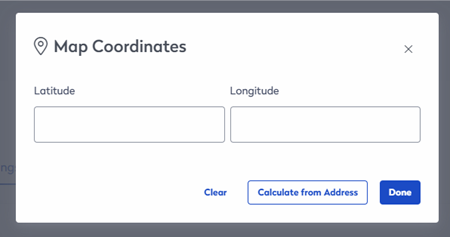
| Map Coordinates |
Your building's map coordinates are taken from the building's address; if you find it is not accurate, then you can enter the latitude and longitude to make an adjustment.
In the Latitude field, enter the latitude and then in the Longitude field, enter longitude. OR Click the Calculate from Address button to caculate the coodinates.
|
Specs Tab
| Fields | Description |
|---|---|
| Ownership | Select either Owned or Leased. |
| Target Seating Ratio | Enter the target seating ratio for the building. |
| Meeting Seating Ratio | Enter the target meeting ratio for the building. |
| Building Cost (USD) | Enter the building's cost in US dollars. |
| Area (measurement system) - Calculated | The area of a building is the sum total of all of the spaces within the building. |
| Exterior Gross Area (measurement system) - Calculated | The exterior gross area is the sum total of the exterior gross. |
| Interior Gross Area (measurement system) - Calculated | The interior gross area is the sum total of the floors within that building. |
| Lease Rental Area (measurement system) - Calculated | The lease rental area is calculated. |
More Tab
| Fields | Description |
|---|---|
| Use Site Operating Hours | If you want the building to inherit the operating hours from the site, then check the Use Site Operating Hours check box. |
| Add Operating Hours |
If you want different operating hours for the building, then complete the following:
|

